
How to Expose a Legacy Spring Boot App as an MCP Server Using Spring AI
Learn how to wrap legacy Spring Boot apps as MCP servers using Spring AI, enabling AI agents to interact with your backend via a unified protocol. The guide covers setup, adapter design, and practical tips for fast AI integration.


MCP (Model Context Protocol) is becoming a go-to standard for AI models to find and work with external systems. Rather than guessing REST endpoints, MCP gives you a clear contract for exposing tools and resources to LLMs (Large Language Models).
Spring AI supports MCP, making it easy to turn backend services into AI-ready interfaces. In this post, we will demonstrate how to wrap a legacy Spring Boot 3 application as an MCP Server without altering its business logic. The following sections will provide a step-by-step roadmap outlining the key stages of this process.
This is a two-part blog; start here, then move to part 2.
 Durga Charan Panda
The Hypothetical Scenario
Suppose your team manages a mature Spring Boot 3 called inventory-service. It handles important business tasks like stock tracking, warehouse allocation, and syncing with suppliers. The service is well-tested, secure, and closely tied to your data layer.
Now, your Operations and Data Science teams want AI agents—using tools like LangChain4j, CrewAI, or custom LLM wrappers—to interact with the inventory service using natural language. Here are some examples:
- "Check current stock for SKU-8842."
- "Flag SKUs with < 5 units across warehouses"
- "Update supplier lead time for PO-1029"
What is MCP, and Why Does It Matter?
MCP (Model Context Protocol) is an open standard designed specifically for how AI models interact with external tools, data, and contexts. Using JSON-RPC, it provides a unified contract for:
- Tool discovery (what can the AI do?)
- Schema-driven execution (how should arguments be structured?)
- Context management (how do we pass state and results?)
- Result serialization (how does the AI consume outputs?)
MCP is built for LLMs, not traditional API standards. It defines explicit capabilities, strict typing, and composable workflows.
Architecture Overview
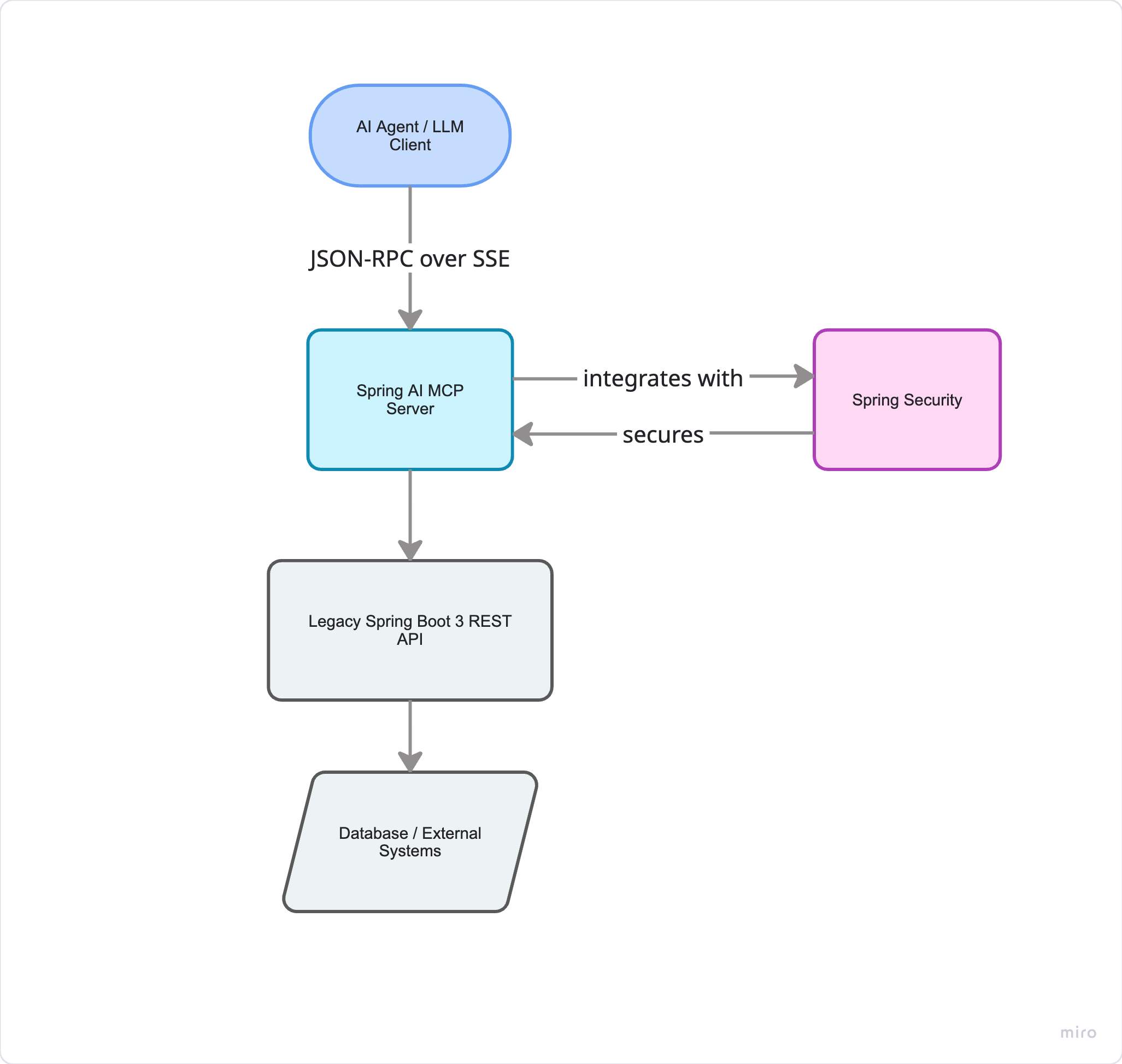
- MCP Server runs as a lightweight Spring Boot app or as an embedded component in an existing app.
- Transport: We'll use SSE for web-friendly agent communication. Stdio is available for CLI/local dev.
- Security: MCP does not manage authentication. You should use your existing Spring Security setup or add a token validator at the transport layer.
- Tool Registration: Any Spring bean method you annotate with
@McpToolwill be automatically registered with the MCP server.
The README.md file in the source includes key usage for tools vs. resources and when to use them.
Step-by-Step Implementation
1. Add Dependencies
<dependency>
    <groupId>org.springframework.ai</groupId>
    <artifactId>spring-ai-starter-mcp-server-webmvc</artifactId>
</dependency>
<dependency>
    <groupId>org.springframework.ai</groupId>
    <artifactId>spring-ai-starter-mcp-server</artifactId>
</dependency>
2. Expose Existing Logic as MCP Tools
To do this, start by designing an adapter layer that sits between your legacy services/controllers and MCP-aware services. Identify which business logic in your Services should be available to AI agents. Then create adapter classes or methods that call this logic, and add the appropriate annotations so the MCP server can find them. This adapter layer translates your legacy functions into MCP-compatible formats that AI agents can use. Do not expose your legacy services directly; instead, put all AI-facing functionality into these MCP-aware adapter services.
public class InventoryMcpAdapter {

    private final InventoryService legacyService;

    // Inject your existing Spring Boot service
    public InventoryMcpAdapter(InventoryService legacyService) {
        this.legacyService = legacyService;
    }

    @McpTool(description = "Retrieve current stock level for a product across all warehouses")
    public int getStockLevel(
            @McpToolParam(description = "Product SKU identifier", required = true) String sku) {
        return legacyService.getStockLevel(sku);
    }

    @McpTool(description = "Update supplier lead time for a purchase order")
    public boolean updateLeadTime(
            @McpToolParam(description = "Purchase order identifier", required = true) String poId,
            @McpToolParam(description = "New supplier lead time in days (non-negative)", required = true) int newLeadTime) {
        return legacyService.updateSupplierLeadTime(poId, newLeadTime);
    }

    @McpResource(uri = "inventory://warehouse/{warehouseCode}", name = "Warehouse Inventory Snapshot")
    public String getWarehouseSnapshot(String warehouseCode) {
        return legacyService.getWarehouseSnapshotJson(warehouseCode);
    }
}
Spring AI will automatically scan these methods, generate the JSON Schema, and register them with the MCP server.
3. Configure the MCP Server
src/main/resources/application.yml
spring:
  application:
    name: inventory-mcp-server
  ai:
    mcp:
      server:
        name: inventory-mcp-server
        request-timeout: 30s
        sse-endpoint: /mcp

logging:
  level:
    org.springframework.ai.mcp: DEBUG
You can find more configuration options in the Spring AI reference documentation.
4. Run & Discover
Start your app. The MCP server will make the following endpoints available:
GET /mcp→ MCP Server InfoGET /mcp(SSE endpoint for streaming)POST /mcp→ JSON-RPC endpoint for tool calls
Test with the official MCP Inspector or a custom client:
{
  "jsonrpc": "2.0",
  "id": 1,
  "method": "tools/call",
  "params": {
    "name": "getStockLevel",
    "arguments": { "sku": "SKU-8842" }
  }
}
The response will be automatically wrapped in MCP’s result envelope and include structured content.
Engineering Thoughts & Practical Considerations
Turning microservices into MCP servers is straightforward, but it does require a new way of thinking:
- Design tools for AI, not just humans. Tool names should be action-oriented (
create_invoice,fetch_inventory). Descriptions must be precise. Parameters should be minimal and strictly typed. LLMs are literal; ambiguity is their enemy. - Set up one MCP server for each domain boundary. Don’t put everything into a single server. Keep your servers aligned with your microservice boundaries, so each one exposes a clear set of capabilities.
- Security is still important. MCP handles tool routing and schema validation, but not authentication or authorization. Use standard authentication methods like
OAuth2, orAPI keysat the transport or gateway level. - Start small, iterate fast. Expose two or three services using the MCP Server. Connect it to an MCP-compatible client or framework. Track latency, error rates, and how well the LLM reasons. Keep improving as you go.
- You must add automated testing: When testing changes, validate your tool schemas, mock MCP client calls, and test fallback paths for the LLM. Treat MCP tools like any public API: version them, document them, and monitor their usage.
Conclusion
To sum up, MCP is a practical short-term solution for quickly and reliably connecting existing services to AI while you work on a more complete long-term setup. MCP lets you prototype and iterate fast. Use it as a starting point and add layers such as governance, memory, and orchestration as your needs grow. Stay up to date on protocol changes and new AI models. As a next step, wrap your key services in MCP, document their use, monitor performance, and plan for ongoing improvements as your AI needs change.


