Building Java-Native AI Agents with Google ADK
This blog explains how Google ADK for Java helps enterprises get the most out of the Java ecosystem.

After more than a decade leading cloud migrations and engineering teams, I've worked with many frameworks. Agentic AI, though, feels like a real game changer.
Generative AI has moved beyond being just a smart autocomplete. Now, it plays an active role in our system designs. In the past, Java developers had to resort to complex workarounds or connect to Python to build these systems. With Google's Agent Development Kit (ADK) for Java, we now have a straightforward, native way to build, test, and deploy advanced AI agents.
We'll build a practical agent together and run it both locally. Follow along to see how these steps work in action.
The Real-World Use Case: The Programmatic Ad Analyst
Let's focus on a field with huge data flows and complex rules: AdTech. Keeping track of Demand-Side Platforms (DSPs), Supply-Side Platforms (SSPs), and Ad Exchanges takes constant attention. Tasks like finding OpenRTB bid request drop-offs or checking win rates are usually slow and manual.
We'll build an AdTech Analyzer Agent. This agent will use a custom Java method, or "Tool," to get real-time bidding data, send it to a Gemini model, and then give you optimization tips automatically.
Complete source code: https://github.com/dcpanda/google-adk-local-example
 dcpanda
GitHub Repo with the source code.
Step 1: Setting up the Project Dependencies
First, add the ADK to your Maven project. The ADK gives you the main SDK and a built-in UI for local testing. Include it in the pom.xml file.
<dependencies>
        <!-- Core Google ADK for Java -->
        <dependency>
            <groupId>com.google.adk</groupId>
            <artifactId>google-adk</artifactId>
            <version>1.2.0</version>
        </dependency>

        <!-- Built-in Dev UI for local testing -->
        <dependency>
            <groupId>com.google.adk</groupId>
            <artifactId>google-adk-dev</artifactId>
            <version>1.2.0</version>
        </dependency>

        <!-- ADK bridge to LangChain4j -->
        <dependency>
            <groupId>com.google.adk</groupId>
            <artifactId>google-adk-langchain4j</artifactId>
            <version>1.2.0</version>
        </dependency>

        <!-- Standard LangChain4j OpenAI client for local servers -->
        <dependency>
            <groupId>dev.langchain4j</groupId>
            <artifactId>langchain4j-open-ai</artifactId>
        </dependency>
    </dependencies>
Step 2: Writing the Agent Code
One of the best things about the ADK is how easily it fits with existing Java backend applications. Set up the agent's persona, link it to the LLM, and add tools using the @Schema annotation.
public class AdTechAnalyzerAgent {

    // 1. Define a Tool for the Agent to use
    @Schema(description = "Fetches the current OpenRTB win rate and average bid floor data for a given SSP or DSP campaign ID.")
    public static String getBiddingMetrics(
            @Schema(description = "The ID of the SSP or DSP campaign") String campaignId) {

        // In a production environment, this would query your AWS RDS or internal data warehouse.
        // For this example, we mock the telemetry response.
        return String.format("Campaign %s: OpenRTB win rate is 38%%, average bid floor is $1.25 CPM. Latency is compliant with IAB Tech Lab standards.", campaignId);
    }

    public static void main(String[] args) {
        // 2. Configure the local server connection
        // baseUrl to "http://localhost:11434/v1" if using Ollama
        // I was unable to make this work with Lm Studio, so I'm using Ollama instead.
        OpenAiChatModel localModel = OpenAiChatModel.builder()
                .baseUrl("http://localhost:11434/v1")
                .apiKey("local-ignore")
                .modelName("gemma4:latest")
                .timeout(Duration.ofSeconds(120))
                .build();

        // 3. Wrap the LangChain4j model for the Google ADK
        LangChain4j adkLocalModel = LangChain4j.builder()
                .chatModel(localModel)
                .modelName("gemma4:latest")
                .build();

        //4. Start the Agent
        AdkWebServer.start( LlmAgent.builder()
                .name("AdTech Analyzer")
                .description("An AI assistant for programmatic ad bidding analysis.")
                .model(adkLocalModel)
                .instruction("You are an expert AdTech assistant. Use the provided tools to fetch campaign metrics and provide clear optimization recommendations based on the data.")
                .tools(FunctionTool.create(AdTechAnalyzerAgent.class, "getBiddingMetrics"))
                .build()
        );

        System.out.println("Agent initialized successfully.");
    }
}
Step 3: Running the Agent Locally
Google ADK ships with an excellent web UI out of the box. The Web UI is based on Spring Boot. Launch the local dev server using Maven:
mvn clean compile exec:java \
-Dexec.mainClass="com.codetoculture.agents.AdTechAnalyzerAgent" \
Navigate to http://localhost:8080 in your browser. You can now chat directly with your agent. Ask it: "Can you check the performance of campaign DSP-809 and tell me if we need to adjust our strategy?" Watch as the LLM intelligently halts its reasoning, calls getBiddingMetrics function, ingests the resulting string, and formulates a strategic response.
exec.mainClass="com.google.adk.web.AdkWebServer" as the main class for ADK to run the agent. Update the AdTechAnalyzerAgent class and remove the AdkWebServer.start from the source code. 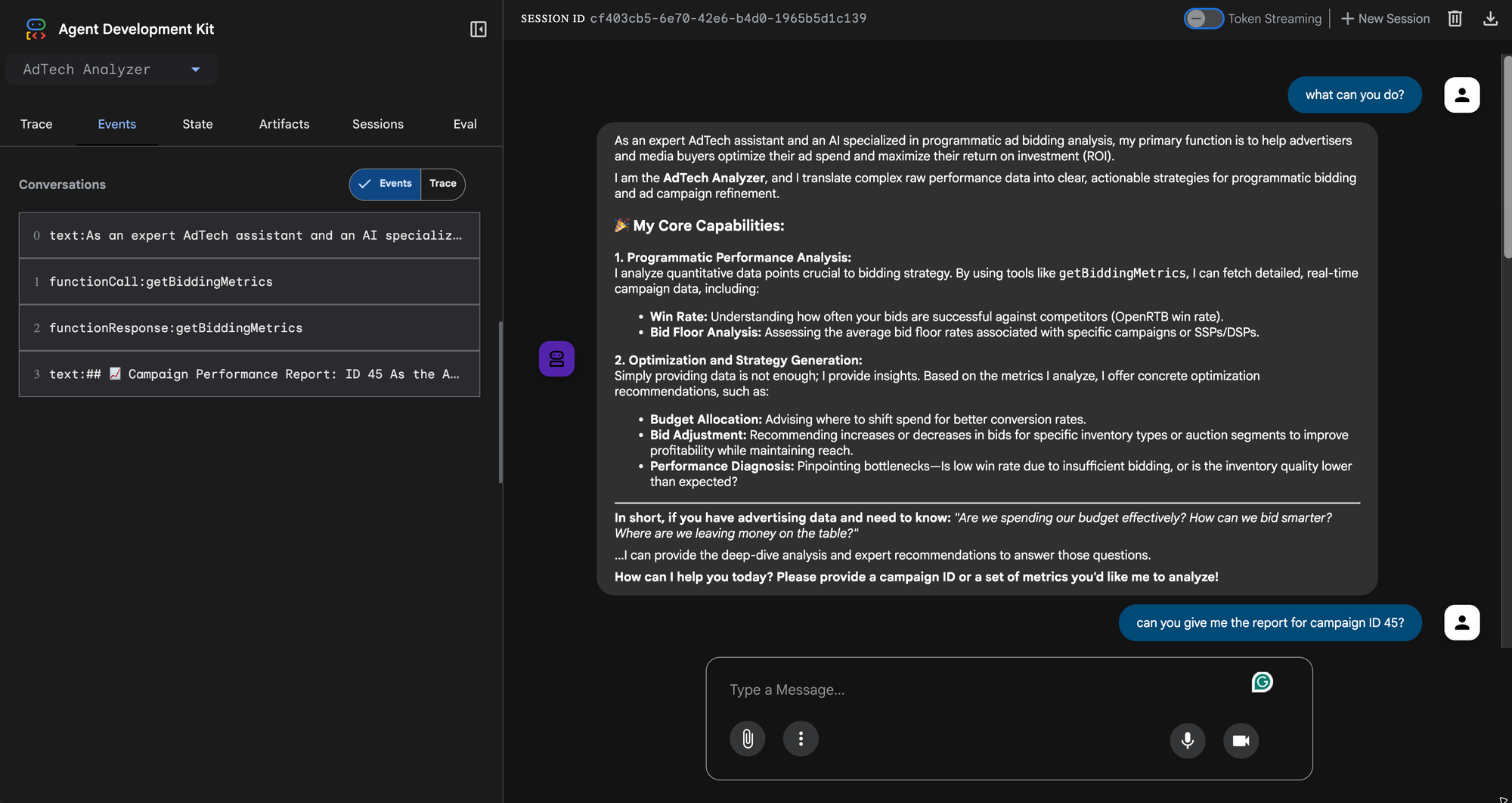
Server Configuration Notes
In this example, LM Studio wasn’t connecting reliably, so I used Ollama to run the local models.
Ollama runs in the background on the port 11434. When you set up your Java code, make sure the modelName matches the downloaded model’s name, like gemma4:latest or mistral. Pick a model that supports tooling.
Here’s an important tip about Tool Calling: If you swap Gemini for a local model, the biggest issue is often whether the model can handle tool requests correctly. Download a model that’s fine-tuned for tool use, like Mistral v3, Gemma 4, or certain Ollama 3 tool-calling versions. If you use a regular local model that isn’t trained for tools, the ADK agent might ignore the Java tool entirely or fail to parse the JSON arguments for getBiddingMetrics . (I ran into this issue with llama2)
Logs: Use the Ollama logs to check whether requests are reaching the server.
tail -f ~/.ollama/logs/server.logIf the agent is working, you will see something like this in the log.
time=2026-05-19T14:47:51.672-04:00 level=INFO source=runner.go:1297 msg=load request="{Operation:commit LoraPath:[] Parallel:1 BatchSize:512 FlashAttention:Enabled KvSize:131072 KvCacheType: NumThreads:12 GPULayers:43[ID:0 Layers:43(0..42)] MultiUserCache:false ProjectorPath: MainGPU:0 UseMmap:false}"
time=2026-05-19T14:47:51.673-04:00 level=INFO source=ggml.go:490 msg="offloading 42 repeating layers to GPU"
time=2026-05-19T14:47:51.673-04:00 level=INFO source=ggml.go:497 msg="offloading output layer to GPU"
time=2026-05-19T14:47:51.673-04:00 level=INFO source=ggml.go:502 msg="offloaded 43/43 layers to GPU"
time=2026-05-19T14:47:51.673-04:00 level=INFO source=device.go:240 msg="model weights" device=Metal size="8.9 GiB"
time=2026-05-19T14:47:51.673-04:00 level=INFO source=device.go:245 msg="model weights" device=CPU size="587.0 MiB"
time=2026-05-19T14:47:51.673-04:00 level=INFO source=device.go:251 msg="kv cache" device=Metal size="2.2 GiB"
time=2026-05-19T14:47:51.673-04:00 level=INFO source=device.go:262 msg="compute graph" device=Metal size="451.0 MiB"
time=2026-05-19T14:47:51.673-04:00 level=INFO source=device.go:267 msg="compute graph" device=CPU size="5.0 MiB"
time=2026-05-19T14:47:51.673-04:00 level=INFO source=device.go:272 msg="total memory" size="12.1 GiB"
time=2026-05-19T14:47:51.673-04:00 level=INFO source=sched.go:561 msg="loaded runners" count=1
time=2026-05-19T14:47:51.673-04:00 level=INFO source=server.go:1385 msg="waiting for llama runner to start responding"
time=2026-05-19T14:47:51.673-04:00 level=INFO source=server.go:1428 msg="waiting for server to become available" status="llm server loading model"
time=2026-05-19T14:47:53.178-04:00 level=INFO source=server.go:1432 msg="llama runner started in 2.40 seconds"
[GIN] 2026/05/19 - 14:48:02 | 200 | 12.300821209s |       127.0.0.1 | POST     "/v1/chat/completions"
[GIN] 2026/05/19 - 14:49:37 | 200 |  1.925025375s |       127.0.0.1 | POST     "/v1/chat/completions"
[GIN] 2026/05/19 - 14:49:49 | 200 | 12.501531875s |       127.0.0.1 | POST     "/v1/chat/completions"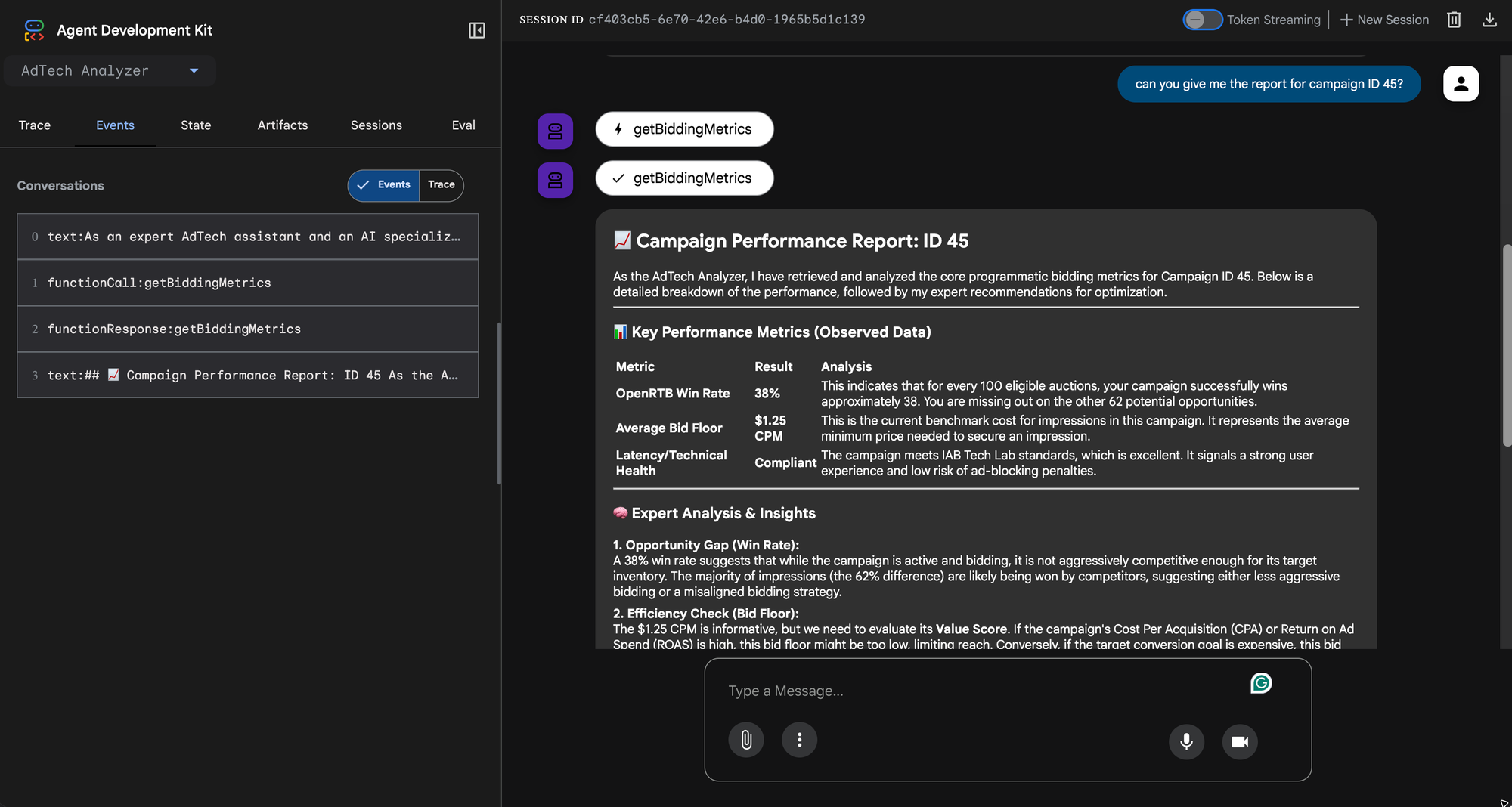
Wrapping Up
Tasks that once needed thousands of lines of boilerplate to connect external scripts and Java backends can now be handled in a single application. Google ADK lets us add AI features directly to our enterprise stacks, moving from simple code to truly intelligent, agentic systems.
In a future blog, I will add guardrails and other security measures to ensure the Agent works with the intent persona and only answers what it is built to.
Reference
- Google ADK https://adk.dev/
- Google ADK GitHub https://github.com/google/adk-java


